
How I AI
Why I built my own AI environment, how I combine local and cloud models, and why I do not believe one AI should do everything.
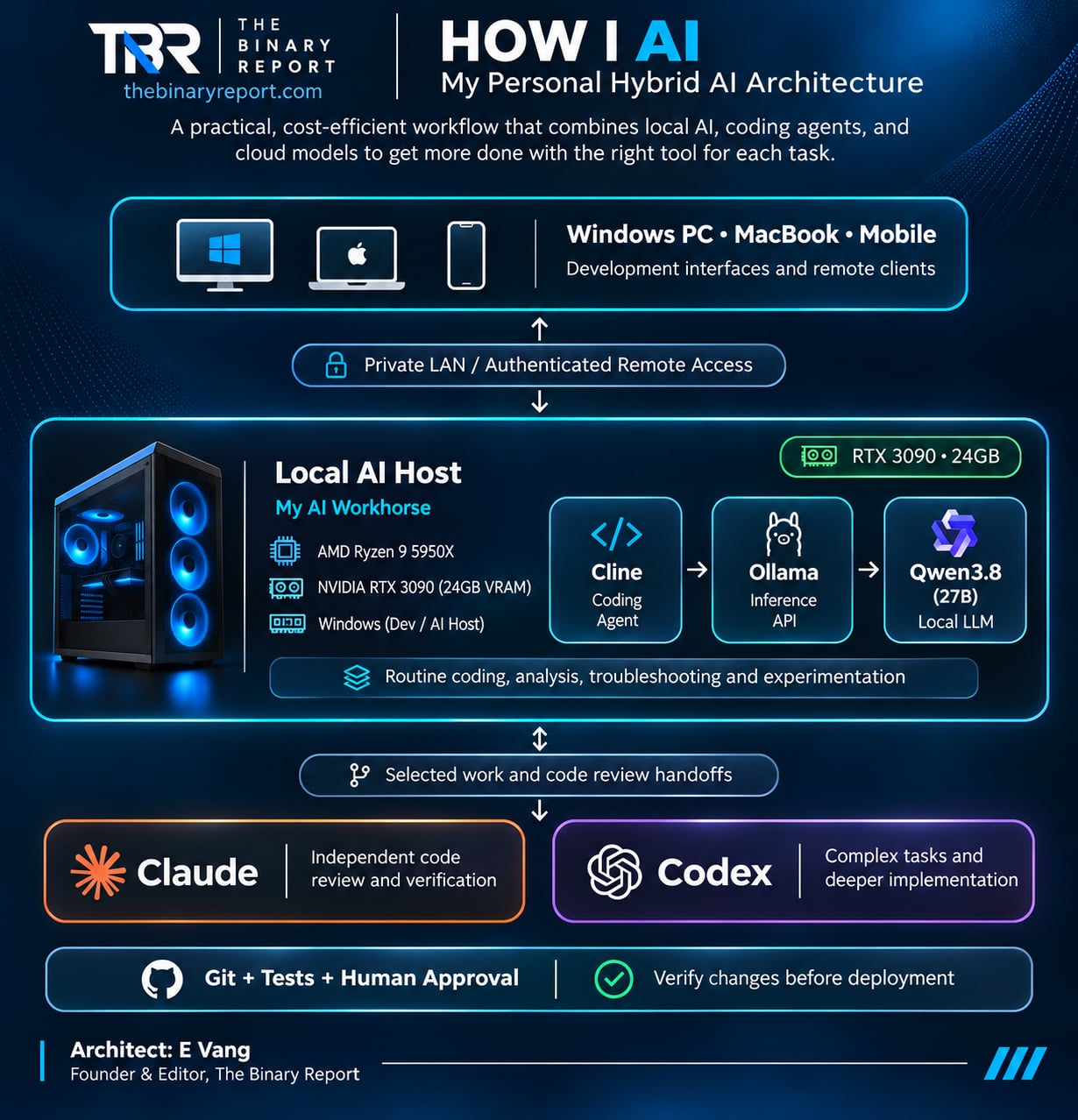
I spend a lot of time using artificial intelligence.
Probably more than the average person.
I use it to write code, research technology, troubleshoot infrastructure, experiment with new applications, and occasionally ask questions that probably could have been answered with a simple Google search.
Recently, I discovered that my lifetime AI consumption had reached approximately 560.1 million tokens.
That’s a lot of conversations with machines.
And it got me thinking about something.
If I’m going to use this much AI, why am I sending every task to someone else’s cloud?
Why am I paying premium AI providers to perform relatively simple coding tasks?
And why am I depending on one model to do everything?
I’ve spent much of my career working with enterprise servers, storage, virtualization, and data-center infrastructure. Building my own AI environment seemed like a natural extension of that experience.
So I started experimenting.
Today, my approach combines a locally hosted large language model, an AI coding assistant, and premium cloud models that I use when the task justifies them.
My goal isn’t to replace ChatGPT, Claude, or Codex.
It’s to stop treating every AI request like it requires the most expensive model available.
Here’s how I AI.
First, I Already Had the Hardware
One advantage of being a technology enthusiast is that I tend to accumulate hardware.
My primary desktop is a Windows machine running an AMD Ryzen 9 5950X processor and an NVIDIA GeForce RTX 3090 with 24GB of video memory.
It’s not a new AI server.
It’s not an NVIDIA DGX.
It’s not sitting in a dedicated data center.
It’s a desktop computer I already owned.
And it turns out that an RTX 3090 is still a pretty capable piece of hardware for running local AI models.
The important specification isn’t necessarily the gaming performance.
It’s the 24GB of VRAM.
Large language models need somewhere to store their model weights and working data while processing requests.
The more memory available to the GPU, the larger the model—or the more working context—you can potentially accommodate without relying heavily on system memory.
That matters because GPUs are extremely good at the parallel mathematical operations used in AI inference.
And while the Ryzen processor and system RAM are useful, I want as much of the actual inference workload running on the GPU as possible.
Moving parts of a model into system memory can help when VRAM is insufficient, but it may significantly reduce performance.
My approach was simple.
Before buying new hardware or renting cloud GPUs, I wanted to see what I could accomplish with the equipment I already had.
Meet Qwen, My Local AI
The model I’m currently experimenting with is Qwen3.8:27B.
The 27B refers to approximately 27 billion model parameters.
Think of parameters as the numerical values the model learned during training.
They aren’t the same thing as intelligence, and a model with more parameters isn’t automatically better at every task.
But parameter count gives us some idea of the model’s scale.
A model of this size would normally require considerable memory if every parameter were stored at full precision.
Fortunately, we have quantization.
Quantization reduces the precision used to represent model weights, allowing larger models to operate with less memory.
There are trade-offs, but modern quantization techniques can make surprisingly capable models practical on consumer hardware.
That’s how I can run a model with tens of billions of parameters on a graphics card originally purchased for gaming.
And because the model is running locally, I’m not paying an API provider for every token it generates.
That doesn’t mean it’s free.
Electricity costs money.
Hardware costs money.
And maintaining the environment takes time.
But the marginal cost of another local request is very different from paying a cloud provider for every million tokens.
For repetitive coding and development work, that’s an attractive proposition.
Ollama: The Engine Underneath
Installing a language model isn’t the same thing as making it useful.
I need software that can load the model, run inference, manage requests, and expose an interface that other applications can communicate with.
That’s where Ollama comes in.
I think of Ollama as the inference-serving layer.
It runs the model on my computer and exposes an API that other software can use.
For anyone unfamiliar with an API, imagine a restaurant.
You don’t need to walk into the kitchen and operate the stove.
You submit an order.
The kitchen prepares it.
You receive the result.
An AI API works similarly.
An application sends a prompt to the model server.
The model processes it.
The application receives the response.
In my environment, Ollama runs on my Windows desktop, loads Qwen, and makes the model accessible through an HTTP API.
The default Ollama API uses port 11434.
That means other applications can interact with my local AI without needing to understand how the model is loaded into GPU memory.
This separation is important.
Because Ollama doesn’t have to be the application I interact with.
It’s the engine serving the model.
I can change the interface without necessarily changing the model.
Or change the model without rebuilding the entire application.
That’s the advantage of separating infrastructure from the software using it.
Cline: Giving My AI Hands
A language model by itself is useful.
But for software development, I want something more than a chatbot.
I want it to work with my project.
Read files.
Understand the codebase.
Suggest modifications.
Edit code.
Run commands.
Inspect errors.
And help troubleshoot problems.
That’s where Cline comes in.
Cline is an AI coding agent that integrates with development environments such as Visual Studio Code.
It can connect to an AI model through an API.
In my case, that model can be Qwen running locally through Ollama.
This creates a simple architecture:
Cline is the agent. Ollama is the inference engine. Qwen is the model.
They’re three different pieces performing three different jobs.
Cline provides the tools and development workflow.
Ollama serves the model.
Qwen generates the instructions, explanations, and code.
That distinction matters because people sometimes assume an AI model can automatically modify their computer.
It can’t.
The model generates responses.
The agent provides the controlled mechanism for interacting with files, terminals, and other tools.
And those permissions deserve attention.
I don’t want an AI agent casually deleting files or deploying untested changes simply because it decided that was the next logical step.
Autonomy is useful.
Unsupervised autonomy can become an expensive debugging exercise.
My AI Architecture
Here’s the basic idea behind my environment.
             MY AI WORKFLOW

       Windows Development Desktop
       ┌──────────────────────────┐
       │ VS Code + Cline          │
       │ AI agent and code tools  │
       └────────────┬─────────────┘
                    │ API requests
                    ▼
       ┌──────────────────────────┐
       │ Ollama                   │
       │ Local inference server   │
       └────────────┬─────────────┘
                    │
                    ▼
       ┌──────────────────────────┐
       │ Qwen3.8:27B              │
       │ NVIDIA RTX 3090 24GB     │
       │ Ryzen 9 5950X host       │
       └──────────────────────────┘

       Other devices on my network
       MacBook / Laptop / Mobile
                    │
          Private authenticated
          network or API gateway
                    │
                    ▼
          Local Ollama service

       CLOUD REVIEW & ESCALATION
       ┌────────────┬─────────────┐
       │ Claude     │ Codex       │
       │ Code review│ Complex work│
       │ Validation │ Larger tasks│
       └────────────┴─────────────┘
The beauty of this setup is that the model doesn’t have to live on the same device I’m using.
My desktop can act as the AI host.
My laptop can act as the client.
And my phone can eventually provide another interface to the same environment.
The heavy computation stays on the machine with the GPU.
The user interface can be somewhere else.
That’s essentially the same client-server concept we’ve used in enterprise computing for decades.
Only now, instead of hosting a database or web application, I’m hosting a language model.
My Desktop Is Becoming a Small AI Server
This is probably my favorite part of the experiment.
My Windows computer is no longer just a personal desktop.
It’s also becoming a service provider for my homelab.
I’ve tested accessing Ollama over my local network from another machine.
The architecture is straightforward.
Ollama runs on the GPU-equipped host.
A second computer sends requests over the LAN.
Ollama processes those requests using the local model.
The result returns to the client.
No cloud inference provider is required for that exchange.
And the client doesn’t need its own powerful GPU.
This opens up some interesting possibilities.
I can use my MacBook for development while my Windows desktop handles the AI workload.
I can experiment with different coding agents without installing the model on every machine.
I can build a lightweight web interface for mobile access.
And I can expose the model to other applications inside my homelab.
For remote access outside my house, the design needs another layer.
I would use a private network or authenticated gateway, such as Tailscale or Cloudflare Access, rather than exposing Ollama directly to the public internet.
That distinction is important.
Ollama’s API isn’t something I want freely accessible to strangers.
And allowing a coding agent to execute commands introduces additional security concerns beyond ordinary chat.
The goal is to make my AI accessible from anywhere.
Not to give the entire internet access to my GPU.
Why I Don’t Let Qwen Do Everything
Now we get to the most important part of my workflow.
I don’t assume my local model is always correct.
Qwen is capable.
For many tasks, it’s surprisingly useful.
But it’s not infallible.
It can misunderstand instructions.
It can generate code that looks reasonable but doesn’t work.
It can overlook edge cases.
And sometimes it can get stuck repeatedly trying to solve the same problem.
That’s where my cloud models come in.
I use Claude as a second opinion, particularly when reviewing code, checking implementation logic, or validating whether a proposed solution makes sense.
The idea is similar to a code review performed by another engineer.
One person writes the code.
Another reviews it.
The reviewer may notice something the original author missed.
Of course, two AI models can make the same mistake.
Agreement doesn’t guarantee correctness.
That’s why I still want actual tests, logs, and working results.
But having a separate model review the work can catch problems before they become bigger problems.
And it means I don’t have to pay for premium cloud inference during every step of implementation.
Where Codex Fits
I also use a paid Codex subscription for more demanding development work.
Some tasks are simply better suited to a more capable cloud coding agent.
Maybe the problem involves many files.
Maybe the architecture needs significant changes.
Maybe the model needs to reason across a larger amount of project context.
Or perhaps I’ve reached the point where continuing to troubleshoot locally is costing more time than it’s saving.
That’s when I escalate.
I don’t view Codex as a replacement for my local environment.
I view it as another tool.
For routine work, I want Qwen doing the heavy lifting.
For code review, I can involve Claude.
For complex implementation or difficult debugging, I can bring in Codex.
And sometimes the correct decision is to use the premium model from the beginning.
The point isn’t to avoid paid AI.
It’s to use paid AI intentionally.
Also, a paid subscription and API billing are different things. Subscription access is governed by its own usage limits and terms; it shouldn’t be treated as unlimited API capacity.
How a Typical Task Moves Through My System
Let’s imagine I’m working on one of my web applications.
I want to add a new feature.
Maybe it’s a database query, a product search function, or an API integration.
My first step is to describe the requirement to Cline.
Cline uses Qwen through Ollama to inspect the relevant project files and propose an implementation.
If the task is appropriate, I allow it to make changes.
Then we test.
Does the code run?
Does it produce the expected result?
Did it break anything else?
If Qwen encounters an error, I may let it attempt a correction.
But I don’t want an endless cycle of trial and error.
At some point, the efficient decision is to stop and reassess.
For a meaningful code change, I can take the relevant diff, requirements, and test results to Claude for an independent review.
If the problem is more complicated, I can move it to Codex.
The cloud model doesn’t necessarily need the entire history of every failed attempt.
It needs the current state of the project, the objective, the relevant code, and the evidence of what isn’t working.
That’s a much cleaner handoff.
It also prevents a local agent’s accumulated conversation history from becoming an unnecessarily expensive cloud prompt.
And I keep Git in the workflow.
Because regardless of which AI wrote the code, I want to know exactly what changed.
This Is Really About Tokenomics
In my previous article, Tokenomics, I discussed the idea of measuring AI efficiency by useful outcomes rather than simply counting tokens.
This architecture is my attempt to put that philosophy into practice.
Local inference changes the economics of experimentation.
If I need to generate several drafts of a function, analyze logs, or iterate on a routine task, I can often do that without accumulating per-token cloud charges.
But there’s a catch.
Local tokens still consume resources.
And failed attempts still consume time.
If Qwen spends thirty minutes repeatedly failing at something Codex could solve in five, the local approach may be cheaper on an invoice but more expensive in productivity.
So the real objective isn’t to maximize local token usage.
It’s to maximize useful work.
I want to reserve expensive cloud capacity for the problems where it provides meaningful additional value.
That’s the economic logic behind the entire system.
The Hardware Has Taught Me a Few Lessons
Running AI locally also reminded me why infrastructure engineering matters.
AI inference can place significant demands on a GPU.
My RTX 3090 has plenty of compute capability, but it’s also a power-hungry card.
I’ve experienced abrupt system shutdowns under demanding workloads, including local AI inference.
That’s not a software error you fix by writing a better prompt.
It’s a reminder that power delivery, cooling, hardware stability, and system configuration still matter.
I’ve experimented with limiting GPU power consumption to around 250 watts.
That can reduce peak power demand, although it doesn’t automatically resolve an underlying hardware or power-supply problem.
And it introduces another consideration.
Performance.
A model might fit into GPU memory, but that doesn’t mean it will run as quickly as you want.
Context length consumes memory.
Quantization affects memory requirements.
CPU offloading can reduce throughput.
Other applications compete for GPU resources.
Running local AI isn’t simply installing a model and forgetting about the machine.
You’re operating infrastructure.
Which, admittedly, is part of why I enjoy it.
Could You Build Something Similar?
Absolutely.
And you don’t necessarily need my exact hardware.
The architecture is more important than the components.
You need a computer capable of running a local model.
You need an inference engine such as Ollama.
You need a client application.
And if you’re doing development, you may want an agent such as Cline.
Start with a model that fits your available hardware.
Test it.
See what it can do.
Then gradually introduce more sophisticated workflows.
For a beginner, even running a small local model and asking it questions is a useful way to understand the technology.
You don’t have to build an entire AI homelab on day one.
And you certainly don’t need to buy an expensive GPU just to prove you can run a language model.
If you already own suitable hardware, start there.
The biggest advantage of a local AI environment is the ability to experiment without treating every prompt as another line item on a cloud invoice.
What I Would Change Next
My environment is still evolving.
I want a cleaner way to access my local AI from different devices.
I want better monitoring of GPU utilization, memory consumption, and inference performance.
I want more consistent handoffs between local development and cloud code review.
And I’d like to make model selection more intelligent.
Imagine a workflow where a request is automatically evaluated before choosing a model.
A simple coding task goes to Qwen.
A difficult architectural problem goes to Codex.
A review request goes to Claude.
And a lightweight classification task goes to an even smaller local model.
All without requiring me to manually switch between applications every time.
That’s where I think personal AI infrastructure becomes particularly interesting.
Not just hosting a chatbot.
But building a system that knows how to distribute work across different models.
Essentially, an AI workflow orchestrator.
The models become resources.
The agents become workers.
And the user focuses on the outcome.
Local AI Isn’t for Everyone
I should be clear about something.
I don’t think everyone needs to self-host AI.
For most people, paying for ChatGPT, Claude, or another hosted service is dramatically easier.
You don’t have to manage GPU drivers.
You don’t have to troubleshoot memory allocation.
You don’t have to worry about inference performance.
You don’t have to keep a computer running.
And you don’t have to deal with hardware failures.
There’s real value in that convenience.
But if you’re a developer, enthusiast, or someone who uses AI heavily, running a local model can be worth exploring.
Especially if you already have the hardware.
The important question isn’t whether local AI is better than cloud AI.
It’s whether local AI makes sense for part of your workload.
For me, it does.
I’m Not Trying to Replace the Cloud
This is something I find interesting about my own approach.
I’ve spent years working with enterprise infrastructure and cloud computing.
I’ve seen organizations move workloads into the cloud.
I’ve seen others move workloads back out.
And I’ve never believed that one architecture is automatically right for everyone.
AI is no different.
Some workloads belong locally.
Some belong in the cloud.
Some benefit from both.
My personal AI environment is essentially a small hybrid AI architecture.
The local GPU handles routine inference.
Ollama exposes that compute as a service.
Cline gives the model tools to work with my projects.
Claude provides an independent review layer.
Codex handles more complex work when necessary.
And my home network lets me separate the machine doing the computation from the device I’m using.
It’s not a revolutionary concept.
It’s traditional infrastructure architecture applied to a new kind of workload.
And that’s what makes it interesting to me.
How I AI
The more I use artificial intelligence, the less I believe in finding one perfect model.
There isn’t one.
Different models have different strengths.
Different workloads have different requirements.
And different deployment methods have different economics.
Sometimes I want the convenience and capability of a premium cloud model.
Sometimes I want the flexibility of running something locally.
Sometimes I want an AI agent to implement a feature.
And sometimes I want a second AI to tell me why the first one got it wrong.
I don’t see those approaches as competing philosophies.
I see them as parts of the same system.
My desktop provides the compute.
Ollama serves the model.
Qwen handles much of the routine work.
Cline connects that intelligence to my development environment.
Claude reviews.
Codex takes on the difficult problems.
And I remain responsible for deciding whether the result is actually correct.
That’s how I AI.
Not by giving every task to the biggest model.
Not by trying to eliminate cloud services.
And not by pretending local inference is free.
But by treating AI the same way I would treat any other infrastructure resource.
Understand the workload.
Choose the right tool.
Measure the result.
And don’t spend more than you need to accomplish the objective.
The future of AI might not be one model that does everything.
It might be knowing which model should do what—and having the infrastructure to make them work together.